
How to Cancel Auto-Renewal or Subscription for Dotstore Plugins
If you no longer wish to continue your premium license, you can cancel your auto-renewal at any time from your account dashboard.
In The Article
How Dotstore Auto-Renewal Works
All premium plugin licenses are set to auto-renew by default.
Auto-renewal ensures:
- Continued plugin updates
- Ongoing compatibility with WooCommerce & WordPress
- Access to support
Your subscription renews automatically on the renewal date shown in your account.
We also send reminder emails before the renewal charge.
How to Cancel Auto-Renewal (Step-by-Step)
You can cancel your subscription directly from your Dotstore account.
Step 1: Log in to your account:
👉 https://www.thedotstore.com/thedotstore-account/
Step 2: Go to My Dashboard
Step 3: Click on Licenses
Step 4: Click the plugin you want to cancel the license
Step 5: Click the Cancel Auto-Renew button
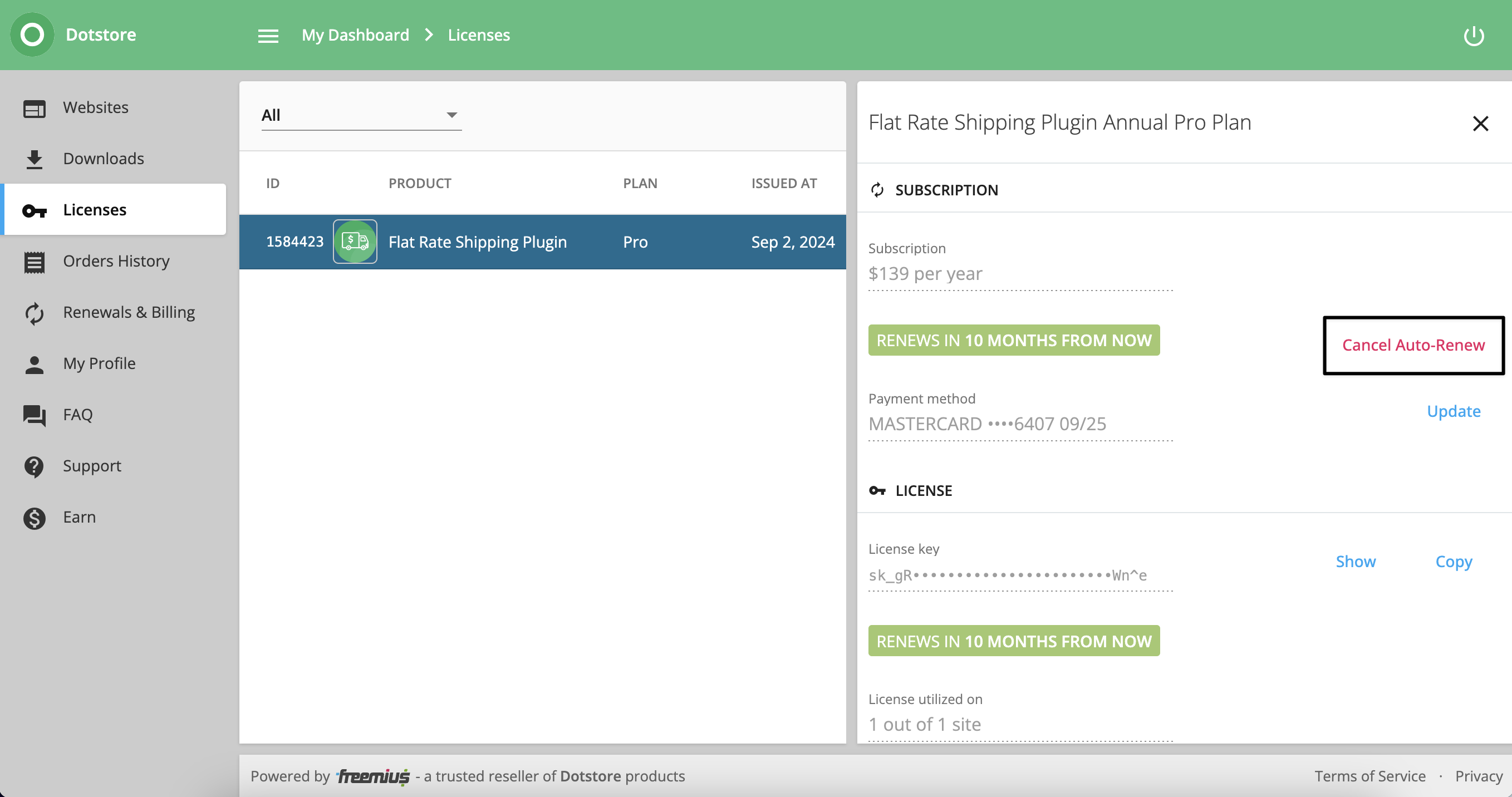
Step 5: Confirm cancellation
Once cancelled:
- You will receive a confirmation email.
- No further automatic charges will be made.
- Your license remains active until its expiration date.
We strongly recommend cancelling from your dashboard for instant confirmation.
When Should I Cancel?
You must cancel before your renewal date to avoid being charged.
Your renewal date is visible inside your subscription details.
If you cancel after the renewal charge has already been processed, the refund policy will apply.
Official Support Contact
Our official monitored support email is:
📧 hello@thedotstore.com
If you send cancellation requests to any other email address, they may not be received.
For immediate action, always cancel directly from your account dashboard instead of relying only on email communication.
What Happens After I Cancel?
After cancellation:
- Your subscription will not renew.
- Your plugin will continue working until the expiration date.
- After expiration, you will no longer receive updates or support.
- The plugin will not be removed from your website.
You can re-subscribe at any time.
I Missed the Cancellation Deadline. What Should I Do?
If your subscription was renewed and you did not intend to continue:
- Contact us immediately at hello@thedotstore.com
- Share your order number
- Explain the situation clearly
Refund eligibility will be reviewed according to our refund policy.
We do not intentionally mislead customers. Renewals are processed automatically by our billing system.
FAQs
Can I cancel by replying to the invoice email?
We recommend cancelling directly from your account dashboard to avoid delays.
I emailed, but did not receive a reply.
Please allow up to 24 business hours for a response. Also, check your spam folder.
Will I lose access immediately after cancelling?
No. Your license remains active until its expiration date.
Can I cancel anytime?
Yes. You can cancel anytime before the renewal date to avoid charges.