
How to show checkout restriction messages on product pages in WooCommerce
The Show Checkout Restriction Messages on Product Pages feature displays cart or checkout validation messages directly on the single product page.
This helps customers understand purchase limits before they reach the cart.
In The Article
Benefits
- Prevent checkout surprises
- Reduce cart abandonment
- Clear communication at the add-to-cart stage
- Better customer experience
How to Enable Checkout Messages on Product Pages
- Go to Dotstore Plugins → Min/Max Quantity
- Open Settings → Messages
-
Enable the "Display message on product page" option
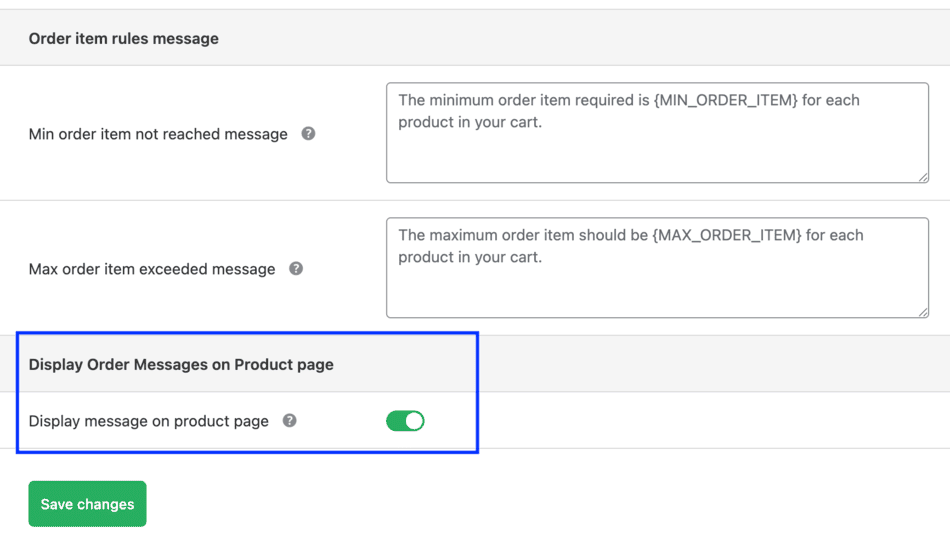
Admin: Enable product page validation message - Save changes
Messages will appear when users click Add to Cart on the product page.

Example Use Cases
- Inform customers about the minimum purchase quantity
- Warn users about maximum quantity limits
- Explain cart-level rules early
Conclusion
Showing restriction messages on product pages improves transparency and helps customers make informed decisions before checkout.
FAQs
1. When exactly does the restriction message appear on the product page?
The message appears when a customer clicks the Add to Cart button, and the checkout or cart rule applies to that product.
2. Will the message still appear on the cart page?
Yes. Showing messages on the product page does not replace cart page messages. The same validation message will also appear on the cart page.
2. Does this feature work for both simple and variable products?
Yes. The restriction message appears for both product types, as long as the rule applies and the product can be added to the cart.