
Advanced Shipping Price Rules - Cost on Shipping Class Weight
The Cost on Shipping Class Weight option under Advanced Shipping Price Rules allows you to calculate shipping charges based on the total weight of products assigned to specific shipping classes.
Instead of checking the product subtotal, this rule evaluates the combined weight of products within the selected shipping class and applies shipping fees accordingly.
For example:
- Standard products (shipping class) → $10 shipping if total weight < 5 kg.
- Fragile products (shipping class) → $20 shipping if total weight < 10 kg.
This helps store owners charge accurate shipping fees for heavier, bulky, or sensitive products without relying on order value.
In The Article
Why use shipping cost on shipping class weight rules?
- Accurate pricing: Charge shipping based on actual product weight instead of order value
- Better cost control: Ideal for heavy, bulky, or fragile products
- Flexible tiers: Create multiple weight-based slabs per shipping class
- Fair charges: Prevent undercharging for heavier items
- Transparent checkout: Customers see shipping fees that match product weight
Configuration steps
1. Access advanced shipping rules
- Go to Dashboard → Dotstore → Flat Rate Shipping.
- Add a new shipping method.
- Scroll down to the section Advanced Shipping Price Rules.
2. Add cost on shipping class subtotal rule
- Find the Cost on Shipping Class Weight section.
- Click Add New Rule.
3. Define rule conditions
Each rule can include:
- Shipping class → Choose the shipping class (e.g., Standard, Fragile, Heavy).
- Minimum weight → The minimum total weight required for the rule to apply.
- Maximum weight → The maximum total weight limit for the rule.
-
Shipping amount → Enter the fee to be applied.
Note: Only integer values greater than 0 are supported for the Minimum Weight and Maximum Weight fields. Decimal or zero values are not allowed.
4. Add multiple rules
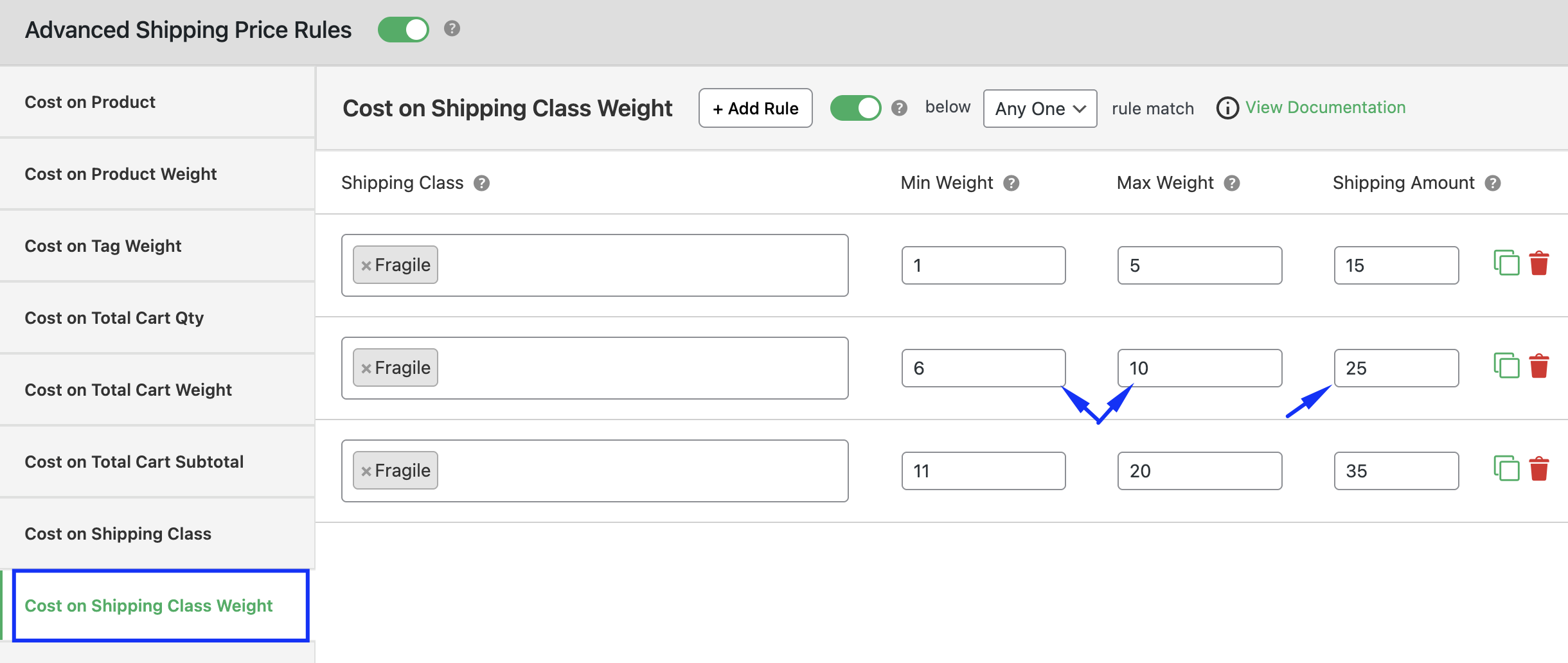
- Example setup:
- Fragile class weight 0–5 kg → $15 shipping
- Fragile class weight 6–10 kg → $25 shipping
-
Fragile class weight 11+ kg → Free shipping
5. Save and test
- Click Save Changes.
-
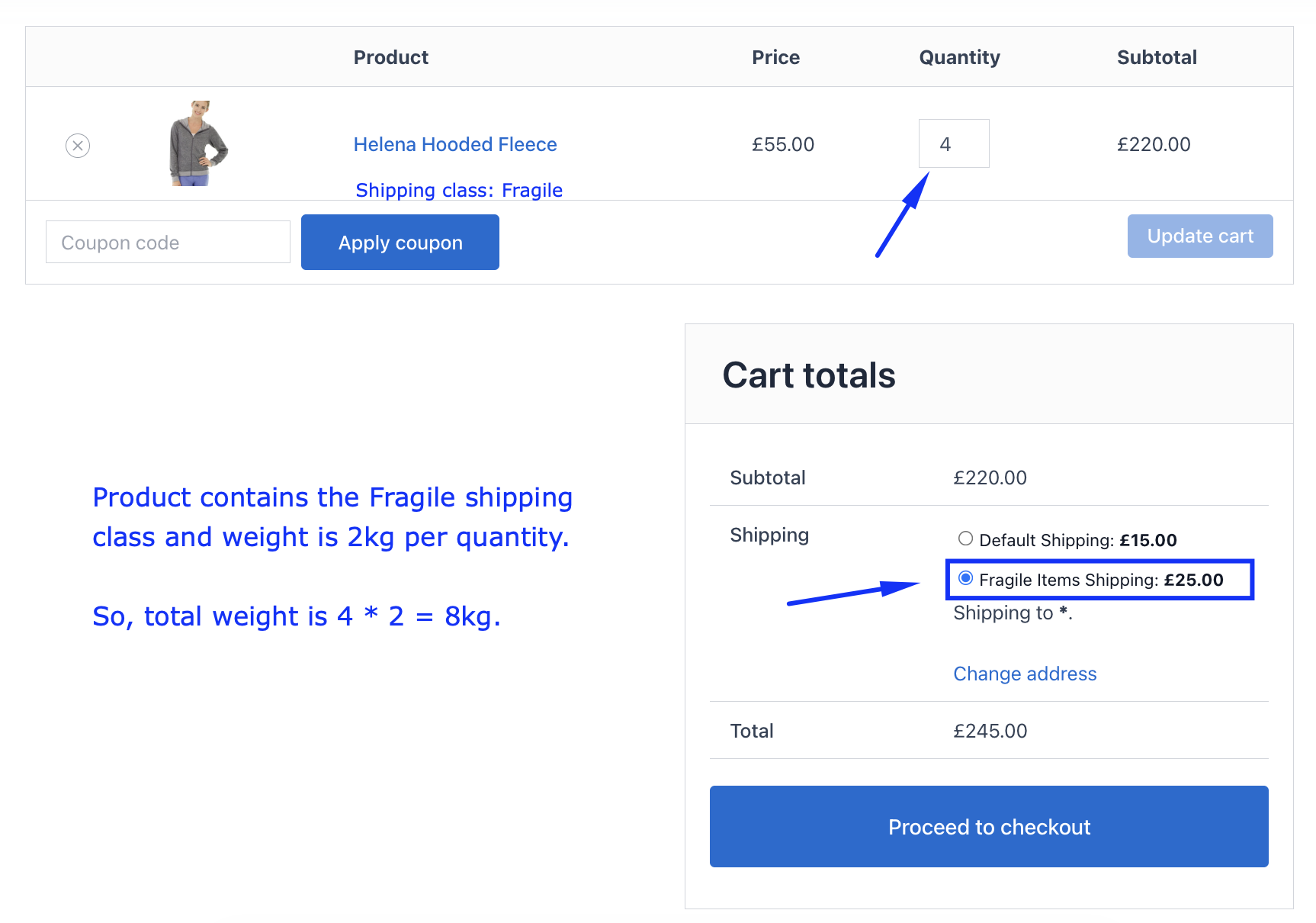
Add products from different shipping classes to your cart and check whether the correct rule applies.
Ready to See All Features in Actions?
Access our complete advanced features instance, allowing you to configure every feature with real checkout scenarios.
Two real examples
Example 1: Fragile vs. standard products by weight
-
Rule 1: Fragile products weight 0–10 kg → $20 shipping
Rule 2: Standard products weight 0–5 kg → $10 shipping
Checkout result:
- Cart with fragile products weighing 8 kg → $20 shipping
- Cart with standard products weighing 4 kg → $10 shipping
Example 2: Free shipping for lightweight orders
-
Rule 1: Heavy products weight 0–20 kg → $30 shipping
Rule 2: Heavy products weight 21+ kg → Free shipping
Checkout result:
- Customer buys heavy products weighing 15 kg → $30 shipping
- Customer buys heavy products weighing 25 kg → Free shipping
Expected outcome
Once configured, WooCommerce will calculate shipping costs based on the total weight of products within specific shipping classes.
This ensures accurate pricing, protects profit margins, and gives store owners full control over shipping fees for weight-sensitive product groups.