
How to Allow Search Engines to Index Product Attachments in WooCommerce
By default, search engines can index publicly accessible files if they are discoverable on your website. Some store owners want their product attachments—such as catalogs, manuals, or brochures—to appear in search results, while others prefer to keep these files out of search engine indexes.
To give you greater control, the Product Attachment for WooCommerce plugin includes an Allow Search Engines to Index Attachments setting.
By default, this option is set to No, which adds noindex and nofollow directives when attachment files are downloaded. If you want search engines to index your attachments, simply change the setting to Yes.
In The Article
Why Control Search Engine Indexing for Attachments?
Not every downloadable file should appear in search engine results. Depending on the type of documents you provide, you may want to either prevent indexing or make attachments discoverable.
This feature gives you complete control over how search engines treat your product attachments.
Benefits of Preventing Attachment Indexing
- Prevent downloadable files from appearing in Google and other search engines.
- Keep product-specific documents focused on customers visiting your store.
- Reduce the possibility of search engines indexing attachment files instead of product pages.
Benefits of Allowing Attachment Indexing
- Improve visibility for product catalogs, brochures, manuals, or installation guides.
- Help potential customers find useful resources before making a purchase.
Configuration Steps
- Install and activate the Product Attachment for WooCommerce plugin.
- Navigate to Dashboard → Dotstore → Product Attachments.
- Open the Global Settings page.
- Locate the Allow Search Engines to Index Attachments option.
- Select one of the following:
- Yes
- No (Default)
- Click Save Settings.
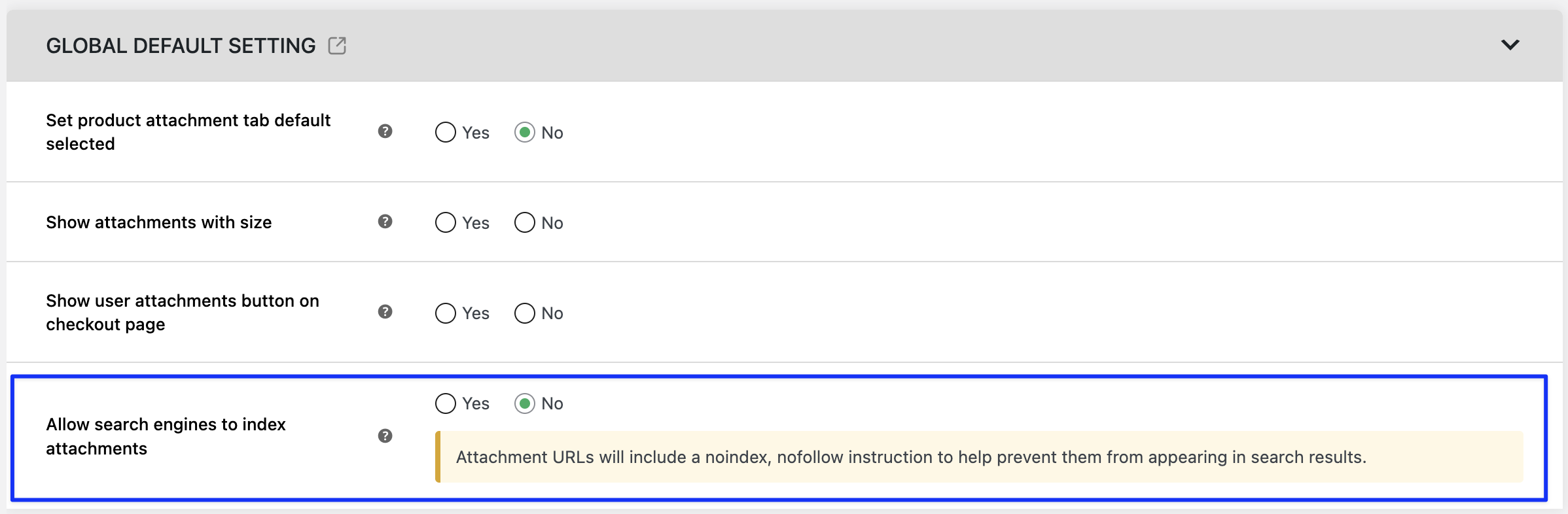
Understanding the Indexing Options
Option 1: Yes
When this option is set to Yes, search engines are allowed to discover and index your product attachments if they are publicly accessible.
This is useful when your downloadable files are intended to be publicly available.
Option 2: No (Default)
When this option is set to No, the plugin discourages search engines from indexing your product attachments.
Whenever a visitor downloads an attachment, the response includes noindex and nofollow directives, indicating that search engines should not index or follow the downloaded file.
Two Real-World Examples
Example 1: Keep Product Manuals Out of Search Results
An electronics store provides downloadable user manuals with each product.
Configuration
- Allow Search Engines to Index Attachments = No
Result
Customers can still download the manuals from the product page, but search engines are instructed not to index the attachment files.
Example 2: Make Product Catalogs Searchable
A furniture store publishes a downloadable seasonal product catalog in PDF format.
Configuration
- Allow Search Engines to Index Attachments = Yes
Result
The catalog can be discovered and indexed by search engines, making it easier for potential customers to find the document online.
Expected Outcome
Once configured, the plugin controls whether search engines are allowed to index your product attachments.
- Yes: Search engines are allowed to discover and index publicly accessible attachments according to their normal crawling policies.
- No (Default): Download responses include noindex and nofollow directives, helping prevent search engines from indexing attachment files.
This flexible setting allows you to choose the indexing behavior that best supports your SEO strategy and business requirements.