
How to apply shipping based on cart subtotal (excluding tax) in WooCommerce
Cart subtotal (excluding tax)–based shipping allows you to apply shipping charges based only on the cart value before tax is added.
This condition checks the actual product subtotal, ignoring all tax amounts, and applies shipping rules accordingly.
For example:
- Charge shipping when the cart subtotal (before tax) is below a certain amount
- Apply a shipping fee only for low-value orders
- Control shipping logic without tax affecting the calculation
In The Article
Why use cart subtotal (excluding tax)–based shipping?
- Accurate pricing: Shipping rules are applied only on product value, not the tax
- Tax-safe logic: Avoid unexpected rule triggers due to tax variations
- Better control: Ideal for regions with different tax rates
- Transparent checkout: Customers see shipping applied consistently
Configuration steps
1. Add or edit a flat rate shipping method
- Go to Dotstore Plugins → Flat Rate Shipping
- Click Add New Shipping Method or edit an existing one
2. Add a cart subtotal (excluding tax) Rule
- In the shipping method settings, go to the Shipping Rules tab
- Click Add New Rule
-
From the Condition dropdown, select Cart Subtotal (Ex. Taxes)
Choose a comparison operator:
- Less than
- Less than or equal to
- Equal to
- Greater than
- Greater than or equal to
-
Enter the subtotal value
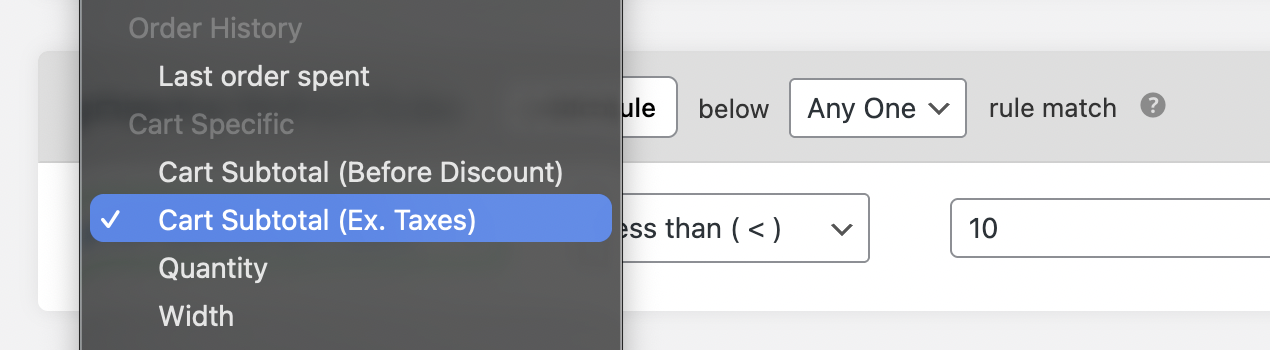
Set cart subtotal (excluding tax) condition
3. Save and test
- Click Save Changes
- Add products to the cart
-
The shipping method should appear based on the cart subtotal before tax
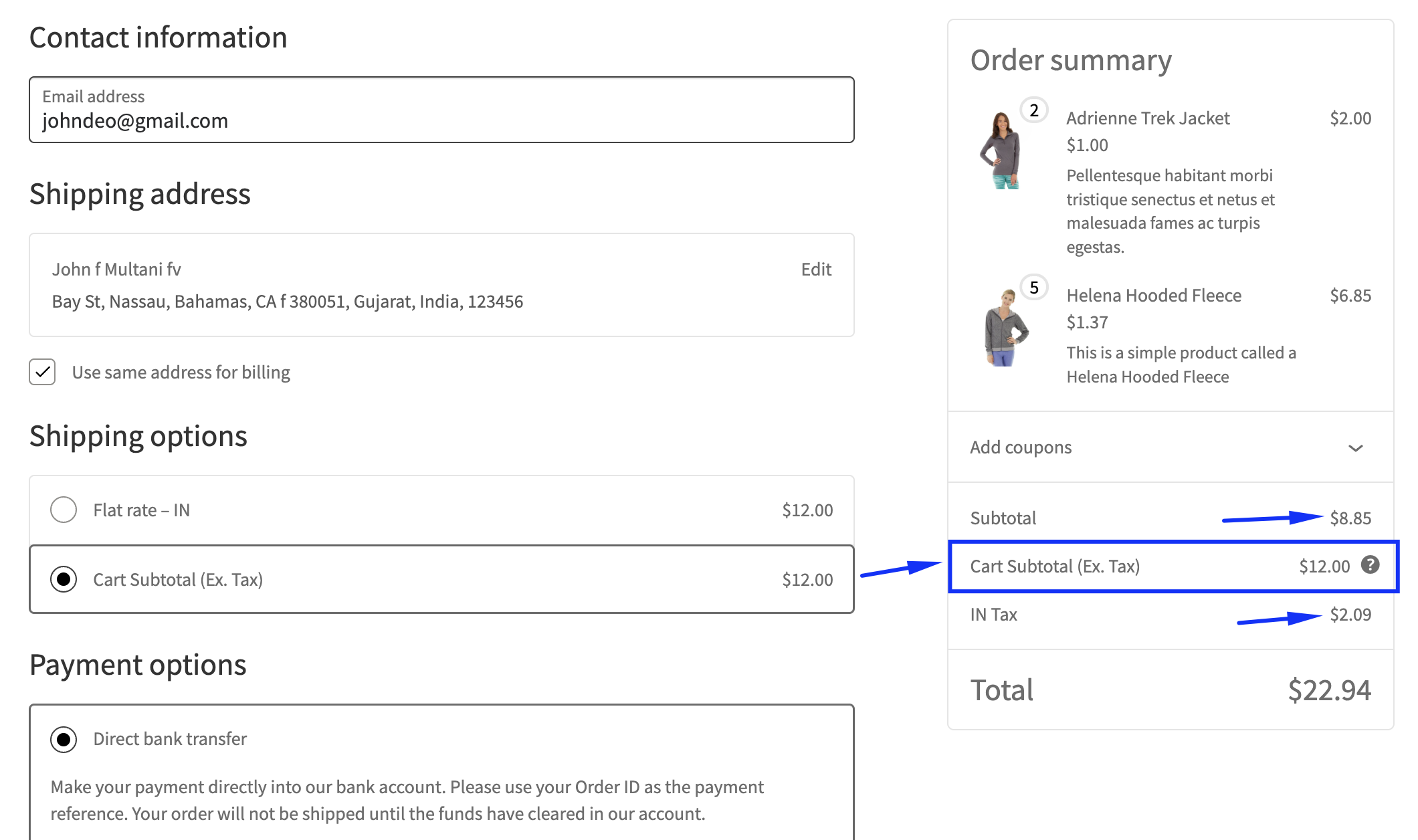
Shipping method on cart page
Ready to See All Features in Actions?
Access our complete advanced features instance, allowing you to configure every feature with real checkout scenarios.
Two real examples
Example 1: Subtotal below the limit
Rule setup:
- Condition: Cart Subtotal (Ex. Taxes)
- Operator: Less than (<)
- Value: $10
- Shipping fee: $12
Cart details:
- Product subtotal (before tax): $8.85
- Tax: $2.09
Checkout result:
- Cart subtotal excluding tax = $8.85
- Rule condition matches
- Shipping fee applied = $12
Example 2: Subtotal above the limit
Rule setup:
- Condition: Cart Subtotal (Ex. Taxes)
- Operator: Less than (<)
- Value: $10
Cart details:
- Product subtotal (before tax): $15.00
- Tax: $3.00
Checkout result:
- Cart subtotal excluding tax = $15.00
- The rule condition does not match
- Shipping fee is not applied
How tax settings affect this rule
-
This condition always ignores tax, regardless of WooCommerce tax display settings
Whether prices are shown:
- Including tax, or
- Excluding tax
The rule calculation is based only on the product subtotal before tax
This ensures:
- Tax amounts never trigger or block shipping rules
- Shipping logic remains consistent across regions
Expected outcome
Once configured, WooCommerce will apply shipping charges only when the cart subtotal before tax meets your defined condition.
Taxes are excluded from the calculation, resulting in predictable, fair, and transparent shipping behavior at checkout.