
How to enable quantity selector on shop & category pages in WooCommerce
This feature allows customers to select product quantities directly from the shop and category listing pages.
In The Article
Benefits
- Faster shopping experience
- Ideal for bulk buyers
- Fewer clicks to add products
- Improved usability
How to Enable Quantity Selector
- Go to Dotstore Plugins → Min/Max Quantity
- Open Settings → Display Rules
-
Enable the "Display Quantity selector on Product Listing" option
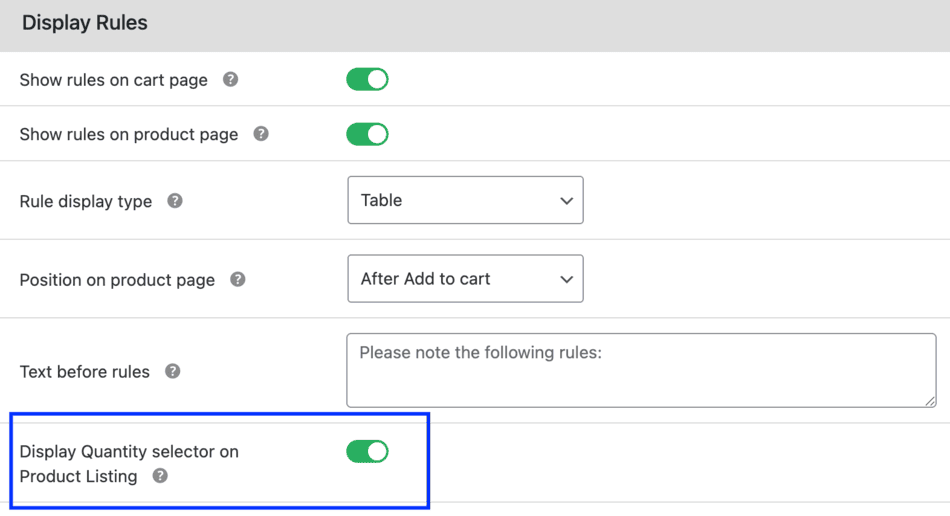
Admin: Enable quantity selector on shop & category pages - Save settings

Limitations
- Works only for simple products
- Variable products require variation selection on the product page
Conclusion
This feature improves shopping speed and convenience, especially for repeat and wholesale customers.
FAQs
1. Why doesn’t the quantity selector appear for variable products?
Variable products require customers to select a variation first. Since variations cannot be selected from shop or category pages, the quantity selector is only shown for simple products.
2. Will min/max quantity rules still apply when using the shop page selector?
Yes. All min/max quantity rules are validated when the product is added to the cart, regardless of where the quantity is selected.
3. Does this feature affect product page quantity selectors?
No. The quantity selector on single product pages remains unchanged and works as usual.