
How to exclude specific categories from checkout restrictions in WooCommerce
The Exclude Categories from Checkout Restrictions feature allows you to prevent specific product categories from being affected by global cart or checkout rules.
This is useful when you have special products like free samples, add-ons, or promotional items that should not follow minimum or maximum quantity, order value, or cart item restrictions.
In The Article
Benefits of Excluding Categories
- Flexible checkout rules without affecting all products
- Exclude freebies or special items easily
- Better control over global cart validations
- Avoid customer confusion for special products
- Cleaner rule management without workarounds
How to Exclude Categories from Checkout Restrictions
- Go to WordPress Dashboard → Dotstore Plugins → Min/Max Quantity
- Open Settings → General
-
Look for the Exclude Category option
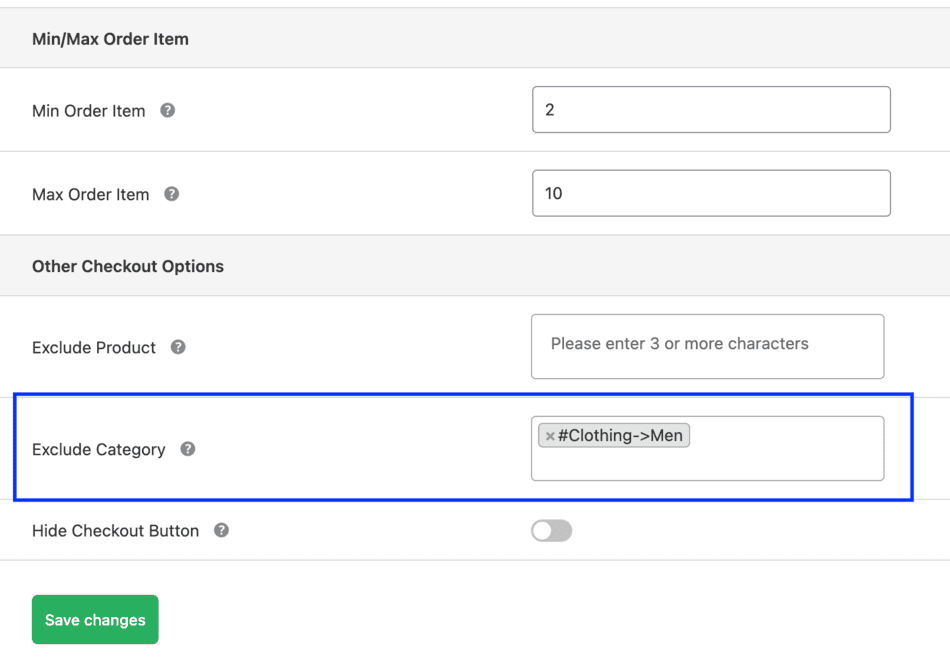
Admin: Category exclusion rule settings - Select the product categories you want to exclude
- Save the settings
Products from the selected categories will now be ignored when checkout restrictions are validated.

Example Use Cases
1. Promotional Products
Allow promotional items to bypass cart limits during sales campaigns.
2. Add-On Items
Exclude accessories or add-ons that should not count toward cart restrictions.
Conclusion
The category exclusion feature gives you greater flexibility when applying global checkout rules. You can enforce strict quantity limits where needed while keeping special products unrestricted.
FAQs
1. What happens if a cart contains both excluded and non-excluded products?
The plugin applies checkout restrictions only to products that are not part of the excluded categories. Products from excluded categories are ignored during validation, while the remaining products are checked normally.
2. Can I exclude multiple categories from checkout rules?
Yes. You can select multiple product categories to exclude from checkout restrictions.
3. Does this work with all types of checkout rules?
Yes. Category exclusion applies to quantity rules, cart item rules, and order value rules configured at checkout.