
Flat Rate Shipping Plugin Compatibility - WPML
WPML is a popular plugin for translating the text within your website into various languages for your international customers. One of the benefits of the Flat Rate Shipping Plugin is that you can define regions worldwide and offer varying flat rate shipping for each. But that means customers speak different languages, so you will want to ensure that your titles translate accordingly.
Before we get started, if you do not have a copy of WPML, you can purchase one here.
Getting started
Start by installing and activating the following:
- Flat Rate Shipping For WooCommerce
- WPML Multilingual CMS
- String Translation
- WPML Multilingual & Multicurrency for WooCommerce
If you’re new to WPML, check out their Getting Started Guide. It quickly walks you through all the translation options you can use.
Note: All the current created fees are automatically moved to your default language.
Our translatable field will be automatically translated if you have automatic translation turned on.
Translating the Shipping Method

-
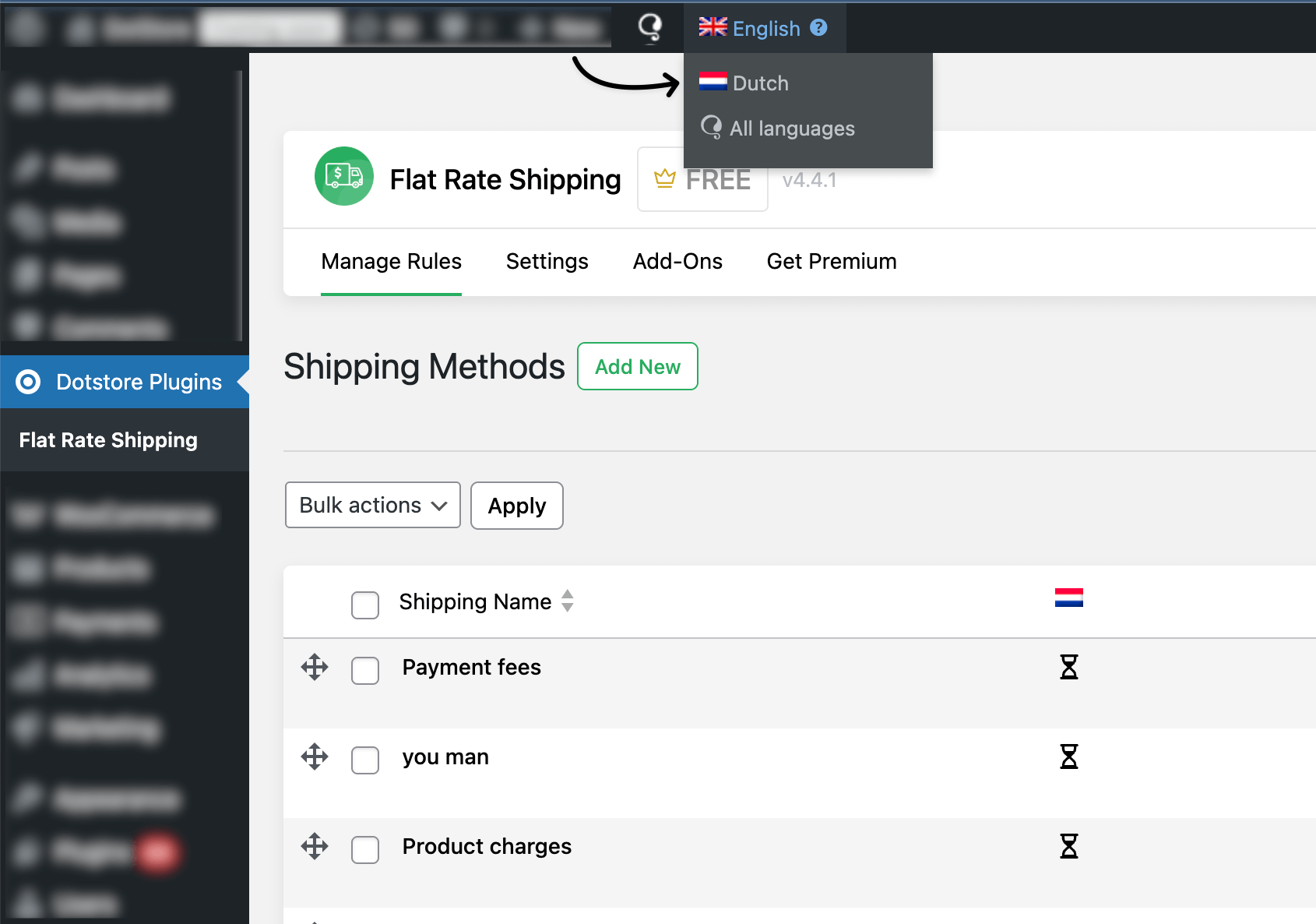
We can see the list of specific languages by selecting a language from the admin bar menu.
-
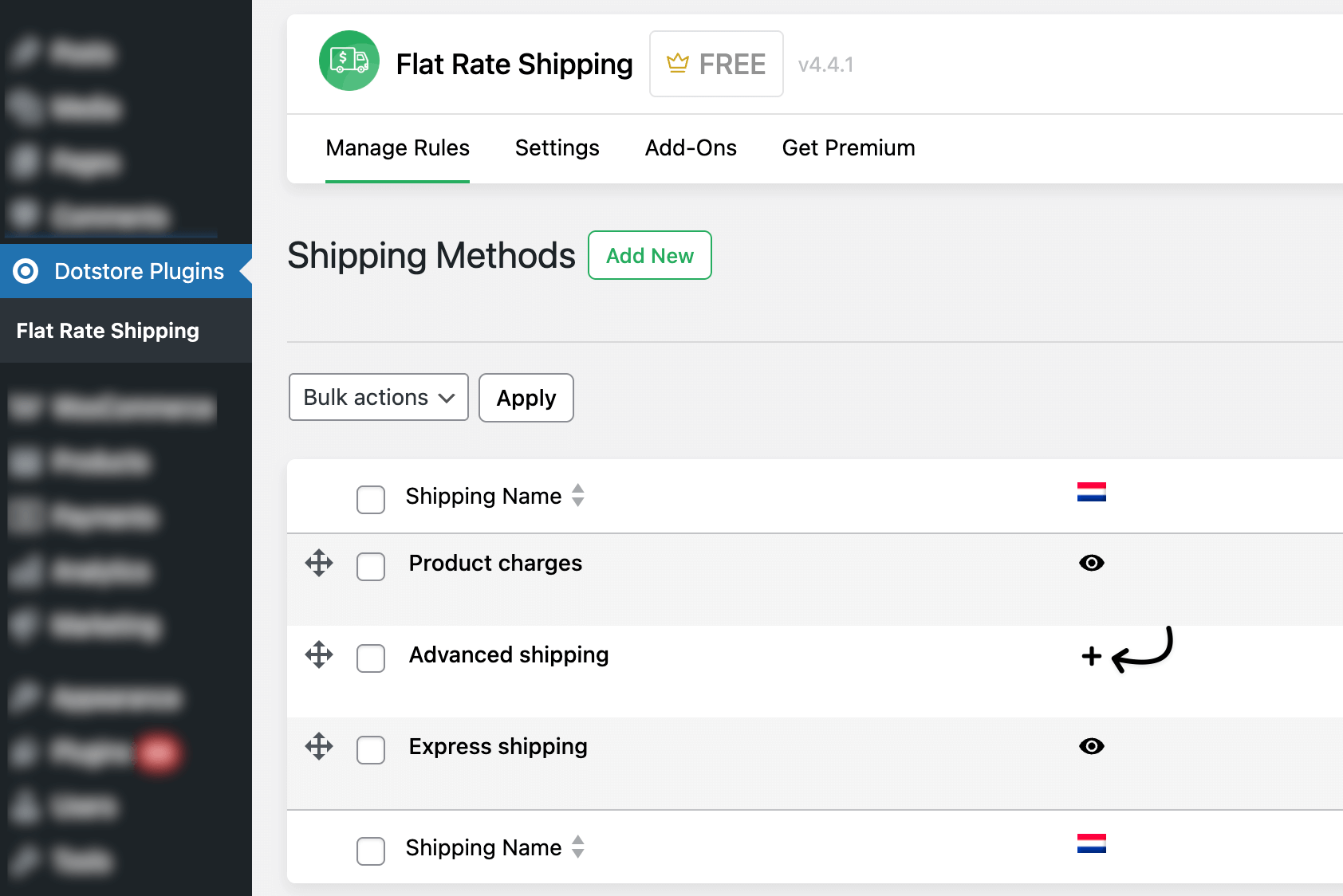
Then, if we want to translate the shipping from our listing page, you can do this by clicking the plus icon corresponding to the fee that you want to translate from the listing, as shown below. Also, you can update that fee by clicking on the pencil icon.
How to Troubleshoot Shipping Rules with WPML
If shipping rules do not apply in secondary languages, check the following:
1. Verify category translations
Go to:
WPML → Taxonomy Translation
Confirm that the category used in the rule exists in all languages.
2. Check translated product categories
Open the translated product and confirm it is assigned to the translated category.
3. Synchronize product taxonomies
WPML includes a synchronization tool that ensures categories remain consistent across translations.
Go to:
WPML → Support → Troubleshooting
Run:
- Synchronize product categories
- Fix product taxonomy relationships
4. Test the rule again
After synchronization:
- Open the product page in the secondary language
- Add the product to the cart
- Verify the shipping rule is applied
FAQs
Why are some shipping methods missing when I switch to English in WPML?
If you are using WPML and notice that some shipping methods do not appear when English (the default language) is selected, this is usually caused by language synchronization settings.
Shipping methods may be created in one language context but not synchronized properly across all languages.
Solution:
- Go to WPML → Settings
- Enable synchronization for WooCommerce shipping methods
- Save changes
- Refresh the Shipping Methods page
Also, make sure you are editing shipping methods in the default language.
Do I need to create shipping methods separately for each language?
No.
Shipping methods should be created only once in the default language.
WPML handles translation of labels and frontend content, but the shipping method configuration itself should not be duplicated manually.
If you create shipping methods while another language is active, they may not appear correctly in the default language view.
Why do shipping methods appear in one language but not another?
This usually happens when:
- WPML WooCommerce Multilingual plugin is not fully configured
- Shipping zones are not synchronized
- Cache is showing outdated data
- Admin language is switched while editing
Recommended Fix:
- Switch to the default language in the top admin bar
- Go to WooCommerce → Settings → Shipping
- Open the shipping zone
- Re-save the zone
Then check the language switch again.
Are shipping zones language-specific in WPML?
No.
Shipping zones and shipping methods are global WooCommerce settings.
They are not meant to be duplicated per language.
If they appear missing in certain language views, it is usually a WPML configuration issue, not a plugin limitation.
Why are my shipping methods not visible on the frontend in a secondary language?
Check:
- Shipping zone matches the customer address
- WPML WooCommerce Multilingual is active
- All products are translated properly
- Currency settings are consistent
Sometimes frontend shipping display depends on the correct product-language mapping.
Should I translate shipping method titles manually?
Shipping method titles can be translated via:
WPML → String Translation
Do not duplicate the entire shipping method.
Only translate the labels.
After switching languages, my shipping methods page looks empty. why?
If the admin shipping methods page appears empty after switching language:
- Switch back to the default language
- Clear browser cache
- Clear WPML cache
- Go to WPML → Support → Troubleshooting
- Click “Synchronize WooCommerce data”
This usually restores visibility.
Does WPML affect custom shipping rules created by the plugin?
WPML does not duplicate shipping rules.
However, rule labels may need translation via String Translation.
Configuration logic remains global.
Why do Shipping Methods only appear when “All Languages” is selected?
WPML may treat some WooCommerce configuration data as translatable or filterable in the admin interface.
When a specific language is selected:
- Some settings may be hidden
- Some entries may appear filtered
- Some shipping methods may not be displayed
Selecting “All Languages” removes this filter.
Why are some Shipping Methods missing when English is selected in WP-Admin?
If you are using WPML and notice that some shipping methods do not appear when the default language (e.g., English) is selected in WP-Admin, this is caused by WPML’s admin language filtering.
Shipping methods are global WooCommerce settings, but WPML may filter the admin view based on the selected language.
When you switch to “All Languages”, WPML shows all configuration entries.
Solution:
- Switch the admin language (top admin bar) to All Languages.
- Go to WooCommerce → Settings → Shipping.
- Re-save the affected shipping zone.
- Switch back to the default language and refresh.
Why Category-Based Shipping Rules May Not Work in Secondary Languages
When using WPML, product categories are translated separately for each language.
Each translated category may have a different taxonomy ID.
Shipping rules that rely on product categories may fail if the translated product is not correctly linked to the translated category.
For example:
- English category: Jackets (ID 45)
- French category: Vestes (ID 92)
If a shipping rule is created using the English category ID, the rule may not apply when customers browse the store in French.
How to fix this issue
- Ensure the product categories are translated in WPML.
- Verify that translated products are assigned to the correct translated categories.
- Use WPML’s taxonomy synchronization tool to align categories across languages.
After synchronization, test the shipping rule again in the translated storefront.
Why are shipping rules not applied in translated languages?
When WPML translates product categories, each translation receives a new taxonomy ID.
If the translated product is not linked to the translated category, shipping rules based on that category may not apply.
Ensure categories are properly translated and synchronized.
Do shipping rules work with WPML-translated products?
Yes.
However, translated products must be assigned to the correct translated categories so the shipping rule conditions can be matched.
Why do shipping rules work in English but not in other languages?
This usually happens when the translated product is not assigned to the translated category.
Verify category translations and run WPML taxonomy synchronization.
How can I test shipping rules in multilingual stores?
Switch the site language using the WPML language switcher and test the product in the translated storefront.
Add the product to the cart and verify whether the shipping rule is applied.
Does WPML affect category-based shipping conditions?
WPML itself does not break shipping rules, but translated categories must be properly configured.
If the translated category relationships are missing, the rule condition cannot match the product.