
How to Hide Other Shipping Methods When Free Shipping or Local Pickup Is Available
It helps customers save money and time, especially when free shipping is not available.
At the same time, store owners save on delivery costs and operational effort.
In many cases, you may want to show only Free Shipping and Local Pickup, and hide all other shipping methods to keep the cart page clean and easy to understand.
In The Article
Example scenario
Let’s say your store works like this:
- Free Shipping is available for customers in New York State
- Local Pickup is available for customers from Albany
Now, Albany is part of New York State.
If a customer from Albany places an order and you enable the option
“Hide all shipping methods when free shipping is applicable”,
The plugin will hide all other shipping methods — including Local Pickup.
This means the customer will only see Free Shipping and will miss the Local Pickup option.
What’s the correct solution?
Instead, you should use the option:
“Hide all shipping methods when Free Shipping or Local Pickup is applicable.”
With this option enabled:
- Customers from Albany will see Free Shipping
- They will also see Local Pickup
- All other unnecessary shipping methods will be hidden
As a result, customers get the right choices without confusion.
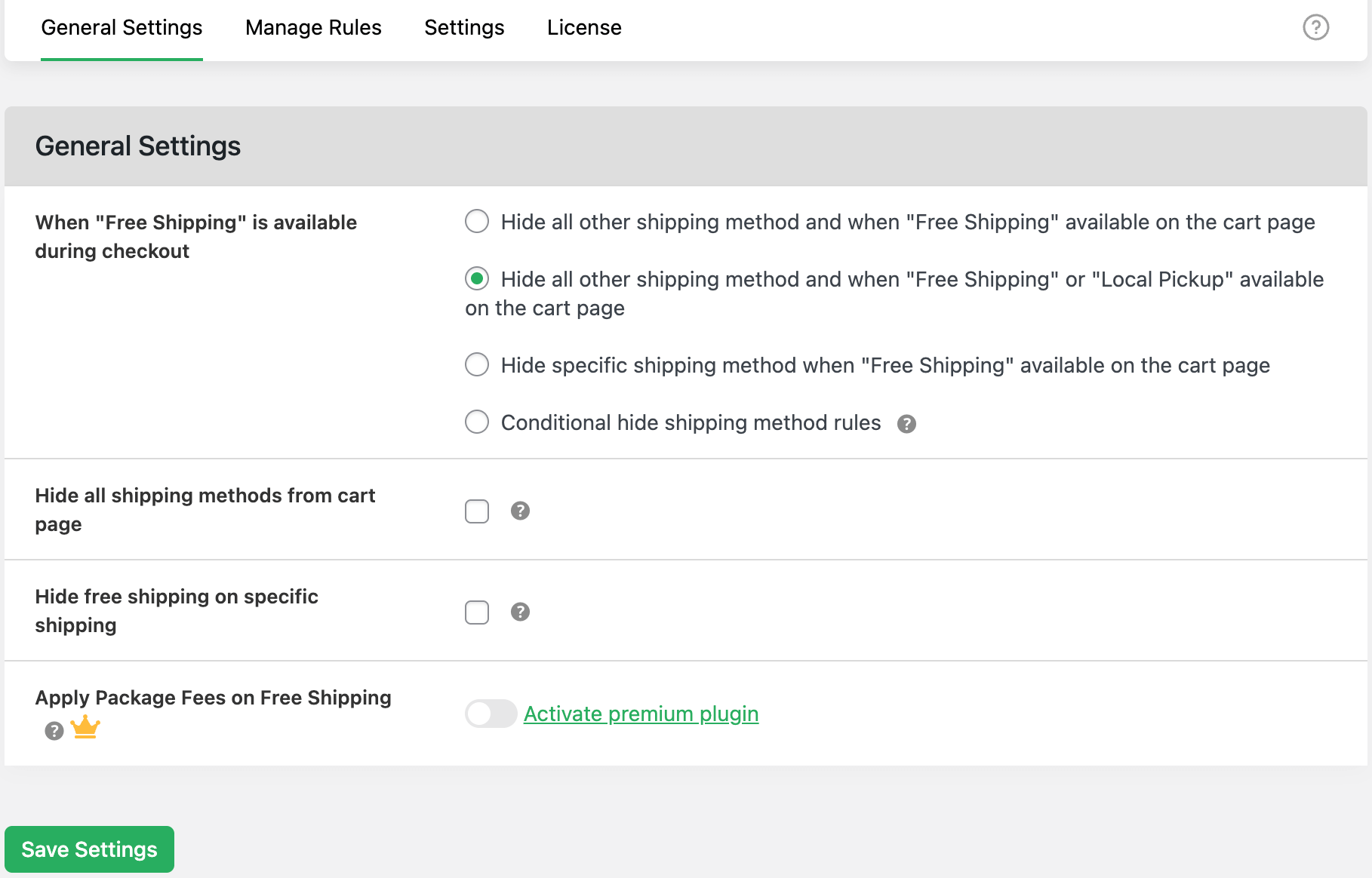
Why this works so well
- Customers clearly see the most relevant shipping options
- No important option (like Local Pickup) is hidden by mistake
- The cart page stays simple and easy to use
- Checkout decisions become faster and smoother
In short, this option gives you exactly the flexibility you need when Free Shipping and Local Pickup overlap.
FAQs
1. Why should I hide other shipping methods when Free Shipping or Local Pickup is available?
Showing too many shipping options can confuse customers. By hiding unnecessary methods, you make the cart page cleaner and help customers choose the best option faster.
2. Will this hide Local Pickup when Free Shipping is available?
Only if you select the wrong option.
To show both Free Shipping and Local Pickup, you must use the option:
“Hide all shipping methods when Free Shipping or Local Pickup is applicable.”
3. Can customers see both Free Shipping and Local Pickup at the same time?
Yes. When this option is enabled, customers will see both options if they are eligible for them.
4. Does this work based on customer location?
Yes. The feature works with location-based rules such as country, state, or city, making it ideal for regional shipping and pickup setups.
5. Will this affect orders that are already placed?
No. The feature only controls what customers see on the cart and checkout pages. Existing orders are not affected.
6. Can I still use paid shipping methods for other customers?
Yes. Paid shipping methods will still appear for customers who do not qualify for Free Shipping or Local Pickup.
7. Do I need any technical knowledge to use this feature?
No. The settings are simple and can be configured without any coding or technical experience.