
How to Get USPS API Credentials for the Advanced USPS Shipping Plugin
The Advanced USPS Shipping Plugin requires valid USPS API credentials to retrieve real-time shipping rates. These credentials are not generated within the plugin. Instead, you must create them through the official USPS Developer Portal and then enter them in your plugin settings.
Important: USPS has retired the legacy Web Tools authentication system and introduced the newer USPS API v3 platform. If you're seeing messages about Web Tools being retired, you'll need to create new API credentials using the USPS Developer Portal.
Before you begin
Make sure you have:
- A USPS Business Account (or create one if you don't have one)
- Access to the USPS Developer Portal
- WordPress admin access to your store
Step 1: Create or sign in to your USPS Business Account
Visit the USPS Developer Getting Started page and sign in with your USPS Business Account. If you don't already have one, create a new business account first.
USPS Developer Getting Started Guide
Step 2: Create a new application
After signing in to the USPS Developer Portal:
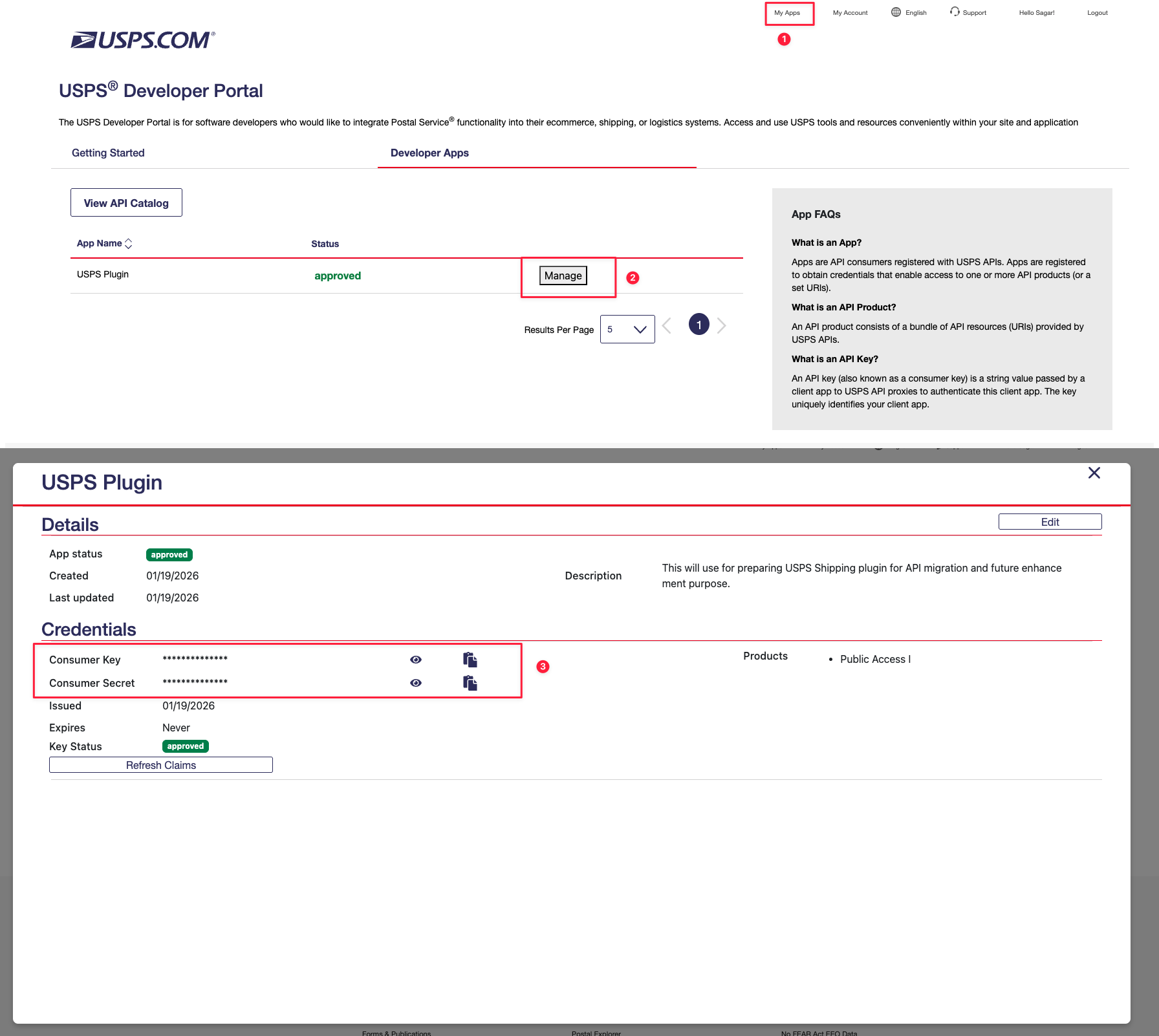
- Open My Apps.
- Click Add App.
- Enter an application name.
- (Optional) Add a callback URL and description.
- Accept the Terms and Conditions.
- Select the required USPS API products.
- Click Add App.
Step 3: Copy your API credentials
Once your app has been created:
- Open the application.
- Go to the Credentials section.
- Copy your:
- Consumer Key
- Consumer Secret
These are the API credentials required by the plugin.
Step 4: Add the credentials to the plugin
In your WordPress dashboard:
WooCommerce → Settings → Shipping → USPS Shipping Method
Enter the following values:
- Consumer Key
- Consumer Secret
Save your settings.

Step 5: Test the connection
After saving the credentials:
- Refresh your shipping settings.
- Test the checkout with a valid shipping address.
- Verify that USPS live shipping rates are displayed correctly.

Troubleshooting
I'm getting a "Web Tools retired" message
This means your old USPS Web Tools credentials are no longer supported. You must register through the new USPS Developer Portal and generate a new Consumer Key and Consumer Secret.
I receive an "Invalid Client Credentials" error
Verify that:
- The Consumer Key and Consumer Secret were copied correctly.
- You're using the credentials from your current USPS Developer App.
- Your application has been created successfully in the Developer Portal.
Rates are not showing
Check the following:
- The API credentials are entered correctly.
- Your store address and shipping destination are valid.
- The required USPS API products are enabled for your application.
- Your server can connect to USPS APIs.
Need help?
If you've completed the USPS registration process but are still unable to connect the plugin, please contact our support team with:
- Your website URL
- A screenshot of the plugin settings
- Any error message you're seeing
We'll be happy to help you verify your configuration and get USPS shipping rates working correctly.